Stitch Plate and Sewing Needle
Sewing ► Stitch Plate and Sewing Needle
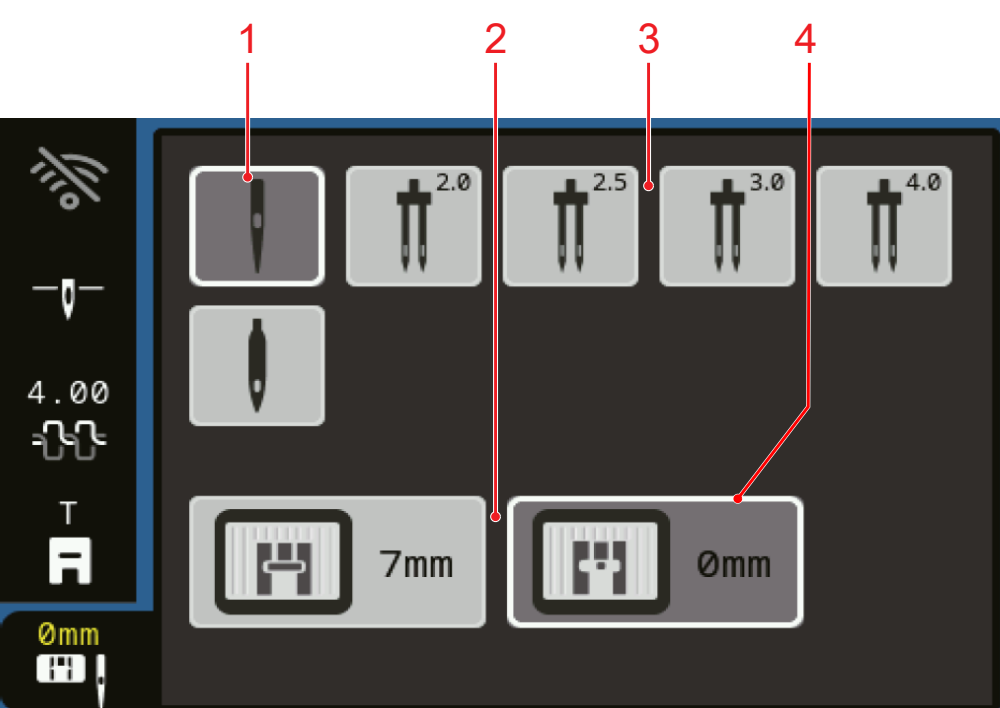
1 | Selected Needle | 2 | Stitch Plate Overview |
3 | Needle Overview | 4 | Detected Stitch Plate |
The attached stitch plate is automatically recognized by the machine and shown in the status bar.
The stitch plates and needles compatible with the machine are displayed in the Stitch Plate Overview and Needle Overview sections.
In order for the machine to check the compatibility of the stitch, the needle and the stitch plate, you must select the inserted needle in the Needle Overview section. The selected needle is highlighted in the area Needle Overview and displayed in the status bar. The detected stitch plate is highlighted in the area Stitch Plate Overview.
If the selected needle cannot be used with the stitch plate or the presser foot, an error message is displayed.