Stitchout Summary
Embroidery ► Stitchout
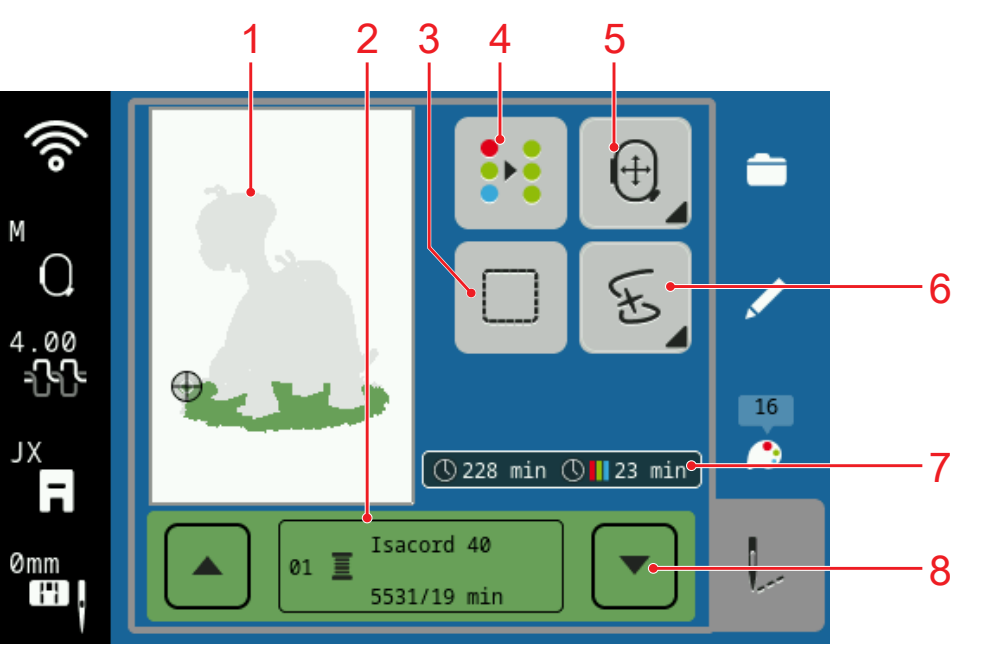
1 | Design Preview | 2 | Current Color |
3 | Basting | 4 | Reduce Thread Changes |
5 | Move Hoop | 6 | Go to Stitch |
7 | Embroidery Information | 8 | Color Up/Down |
In the Stitchout Summary screen, you can modify the most common settings for optimal stitchout quality before starting the stitchout. Additional settings can be modified in embroidery settings. Embroidery Settings
Basting
With the Basting function, you can secure materials in the hoop that cannot be hooped, e.g., felt, organza and silk. The basting can also be used to prevent top stabilizers from moving or as a guide for trimming after embroidery. The following functions are available:
- Deactivated: No basting seam sewn.
- Baste Around Design: To sew the basting seam around the embroidery design.
- Secure at Beginning
 : To sew securing stitches at the beginning of the basting seam.
Tip
There are no sew-on stitches in the basting seam. Pull the bobbin thread to the top of the fabric before stitching the basting seam and hold both threads for the first stitches.
Move Hoop
With the Move Hoop function, you can correct the position of the embroidery hoop if, for example, a border or lettering is not stitched out cleanly.
After rehooping the fabric, you can align the position of the embroidery hoop with the stitch that was embroidered last.
Go to Stitch
With the Go to Stitch function, you can return to a specific point in the embroidery after a thread break or other interruption in the embroidery process in order to continue stitching from that point. The machine displays the needle position at the time the process was canceled.
You can move from stitch to stitch or use the buttons Stitch Length to move in larger increments.
If you wish to return to a specific stitch, you can enter the number of the stitch.
Single Color
The setting Single Color allows you to embroider the design without any thread change using the thread that is threaded.