Stitchout
Embroidery ► Stitchout
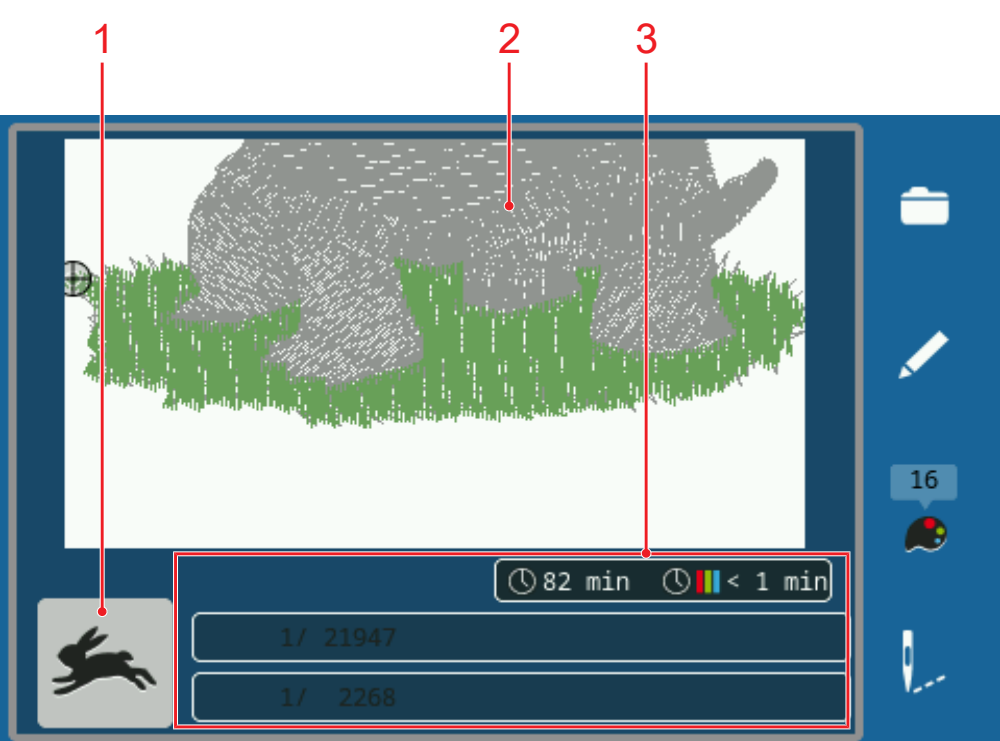
1 | High Speed | 2 | Design Preview |
3 | Embroidery Information |
The Stitchout screen appears when the embroidery design is ready for stitching out. You can start stitching with the Start/Stop button.
If the embroidery process is interrupted, the last embroidered position is automatically approached after the machine is restarted.
High Speed
Embroidery designs are embroidered at the optimum speed to ensure an even stitch appearance. The optimum embroidery speed depends on the hoop used. With the High Speed function, you can increase the embroidery speed up to the saved maximum speed. Depending on the type of stitch, e.g. triple stitch, the function may result in an irregular stitch pattern.
This function is only available once you have started stitching out using the Start/Stop button.
Single Color
The setting Single Color allows you to embroider the design without any thread change using the thread that is threaded.
 : Finish embroidering and return to the embroidery screen.