Hoop Overview
Embroidery ► Hoop
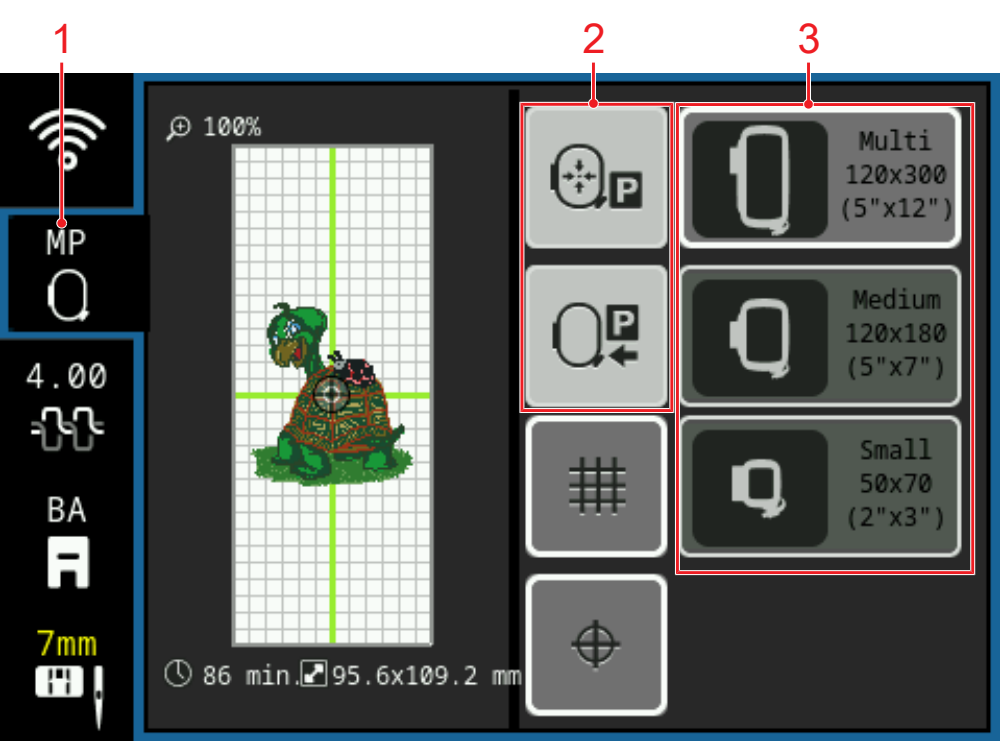
1 | Attached Embroidery Hoop | 2 | Hoop Relocation |
3 | Hoop Selection |
Attached Embroidery Hoop
The attached embroidery hoop is recognized automatically by the machine. The name of the recognized embroidery hoop is displayed in yellow in the status bar.
If no embroidery hoop has been attached, an embroidery hoop matching the size of the embroidery design is preselected in the Hoop Selection section. The selected embroidery hoop is displayed in the status bar.
Hoop Relocation
In the Hoop Relocation area, you can move the attached hoop to certain positions.
- Centered: For easier threading of the needle.
- Sewing Position: For free-motion sewing or quilting without having to remove the embroidery module. If a hoop is attached, you will be prompted to remove the hoop.
Hoop Selection
The hoops compatible with the machine are displayed in the Hoop Selection section.
To prepare the embroidery design, you can select a suitable embroidery hoop before attaching the hoop.